Microsoft Excel - Excel Basics
Part 10 - Hiding Worksheet in Excel
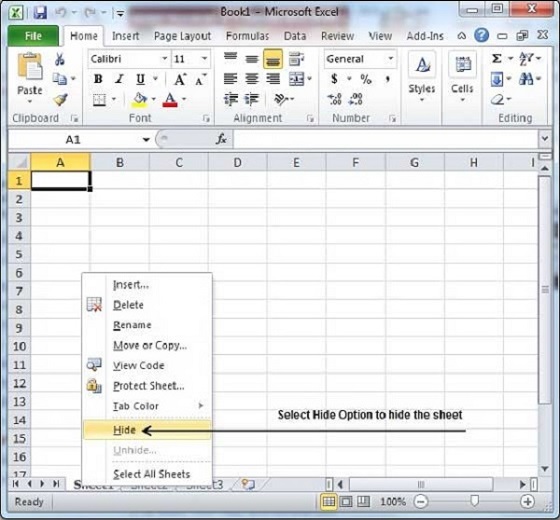
Here is the step to hide a worksheet.
Step − Right Click the Sheet Name and select the Hide option. Sheet will get hidden.
Unhiding Worksheet
Here are the steps to unhide a worksheet.Step 1 − Right Click on any Sheet Name and select the Unhide... option.
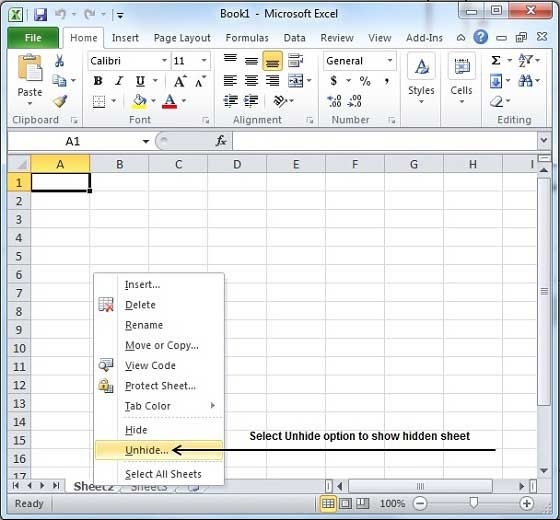
Step 2 − Select Sheet Name to unhide in Unhide dialog to unhide the sheet.
Press the Ok Button.
Now you will have your hidden sheet back.


AB21702774
ReplyDeleteTakipçi Satın Al
MMORPG
SEO Ajansı
Video indir
Cami Şamdanı
TT Ücretsiz Beğeni
En Çok İzlenen Filmler
Beğeni Hilesi
İzlenme Hilesi